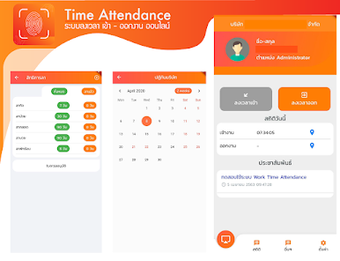
mTimeAttendance: Mobile GPS-based time and attendance for Android
mTimeAttendance, from MIS Developer-Pro, is a portable attendance management app that replaces paper or fixed hardware by letting users check in with smartphones. The app records online time and attendance, uses GPS-based location verification, and synchronizes entries in real time with a central log. It includes quick check-in/out controls, searchable history logs, and minimal data collection for privacy-conscious deployments. Designed for employees, students, and staff, it suits organizations wanting a mobile-first attendance option on Android.
How the app constructs a verifiable attendance record
The app captures a timestamp plus device location when a user initiates a check-in, then sends that payload to a central record in real time. That process links the user's action to a stored history log, giving administrators a searchable trail of past entries. This mechanics-first approach clarifies what is recorded and explains why records are available immediately after a user submits an entry.
What it demands from the device and network
mTimeAttendance is described as a lightweight Android utility, designed for regular use on modern devices. Because it operates online and synchronizes as events occur, deployments require network access during active check-ins. The developer also issues regular updates to support current Android releases, which reduces compatibility risk but requires administrators to keep devices on recent system versions for best results.
How the app handles location data and privacy
The developer's data safety declaration states that no data is shared with third-party companies, and the app uses minimal data collection by design. Location information is sent to verify presence at a site, so devices must grant location permission for that verification to function. Those two facts position the tool for privacy-conscious environments where administrators want location-based confirmation without external sharing.
Who can operate the app and what administrators should expect
The interface aims for quick check-in and check-out workflows so routine users such as employees or students can operate it with little technical training. MIS Developer-Pro's portfolio links the app to a management information suite, so larger deployments should anticipate integration work with existing MIS backends. For small teams or schools, setup is mainly device provisioning and permission grants rather than extensive IT configuration.
Practical choice for mobile-first attendance, with a deployment caveat
mTimeAttendance suits schools and small organizations that prefer a phone-centered attendance system and limited data sharing. The install base is modest, and the app's association with the developer's MIS ecosystem may constrain external integrations. Practical tip: run a short pilot with administrative accounts to confirm compatibility before wider rollout. Recommended.